
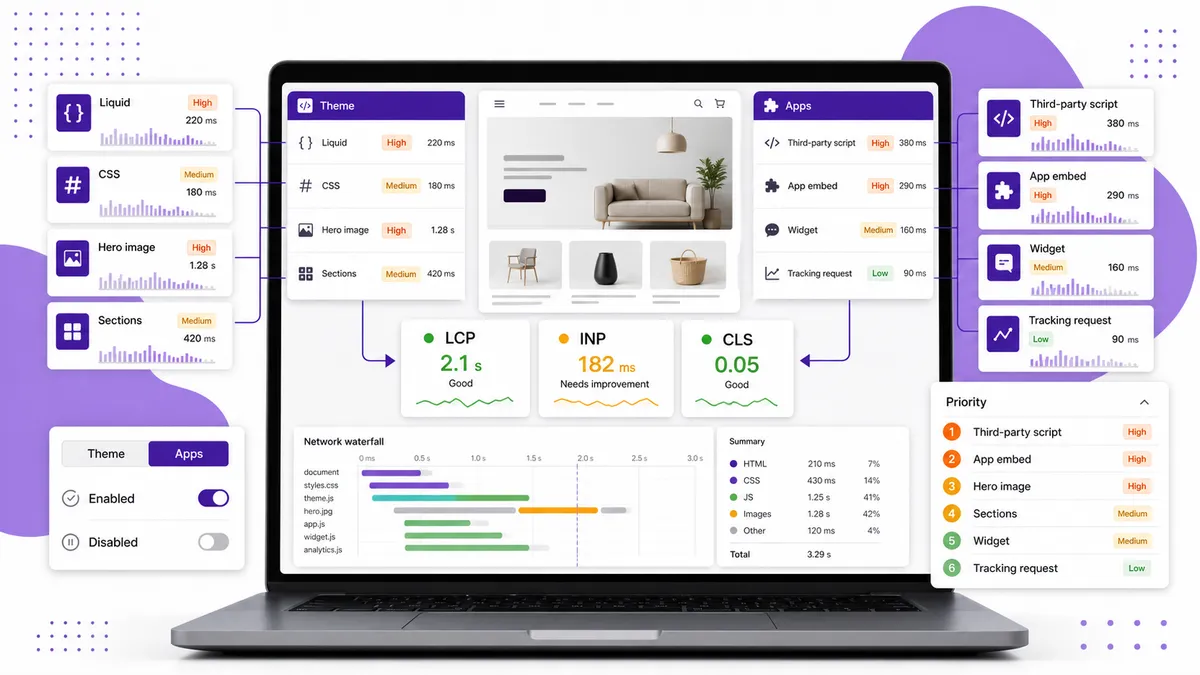
To tell whether a Shopify theme or an app is slowing your store, compare the same pages under controlled conditions: current live storefront, duplicate theme with app embeds disabled, and a clean theme baseline. Then inspect which metrics and network requests change. Do not start by uninstalling apps or publishing a new theme.
In many stores the honest answer is “both.” The point of testing is to find which layer is responsible for which part of the delay so you fix the highest-impact cause first.
Why the speed score cannot answer this alone
A single number tells you the result, not the owner of the problem.
Shopify’s theme performance guidance explains that theme Liquid affects server rendering, while JavaScript from both theme code and installed apps can delay loading and interaction. Images, fonts, tracking scripts, and app blocks all meet in the same page.
Use the individual signals:
- Slow Time to First Byte (TTFB): points toward expensive Liquid work or server-rendered theme logic
- Poor Largest Contentful Paint (LCP): often points toward hero/product images, render-blocking resources, or delayed content
- Poor Interaction to Next Paint (INP): often points toward too much main-thread JavaScript
- Poor Cumulative Layout Shift (CLS): points toward late-loading media, fonts, banners, or app-injected elements
These are clues, not convictions. Confirm them with controlled comparisons.
First, create a safe test environment
Duplicate your live theme. All experiments should happen on the copy.
Choose three representative URLs:
- Homepage
- A product page with important app blocks
- A collection page with real filters and product cards
Run each page at least three times under the same mobile test conditions and use the median. Our guide to testing Shopify theme speed before publishing covers the full measurement process.
Record LCP, INP or lab interaction proxies, CLS, total JavaScript, and the slowest network requests. The baseline matters more than any universal “good” score.
Test 1: Disable app embeds and blocks on the duplicate theme
In the duplicate theme—not live—disable non-essential app embeds and remove app blocks from the test templates. Change one app at a time where possible.
Then rerun the same pages.
Evidence that an app is contributing includes:
- A large third-party script disappears from the network waterfall
- Main-thread JavaScript and interaction delay fall sharply
- An app block was the largest visible element and LCP improves without it
- Layout shift disappears when a late-loading widget is removed
- Performance worsened shortly after that app or embed was added
Do not assume every request from an app is waste. A reviews widget, search tool, or subscription selector may justify its cost by helping customers buy. The decision is value versus performance cost, not “all JavaScript is bad.”
Test 2: Compare with a clean theme baseline
Install a clean, unmodified Shopify theme as another unpublished test. Add representative products and content, but avoid recreating every design flourish.
If the clean theme is much faster even before app blocks are added, your current theme may carry:
- Bloated Liquid loops
- Large CSS or JavaScript bundles
- Heavy sliders and animation libraries
- Too many sections or deeply nested markup
- Oversized above-the-fold media
- Old snippets and integrations accumulated over time
If both themes slow down only after the same apps are enabled, app impact is the stronger lead.
The clean baseline is a diagnostic tool, not an automatic recommendation to redesign the store. Replacing a theme is expensive; use the comparison to decide whether targeted cleanup is enough.
Signs the theme is the main problem
Look harder at the theme when:
- Slow pages remain slow with app embeds disabled
- TTFB is poor and Liquid rendering is complex
- The largest delays come from first-party theme assets
- Unused CSS and JavaScript ship on every page
- A homepage loads several off-screen slides or videos immediately
- Collection pages become dramatically slower as product-card count grows
- The theme contains years of duplicated snippets and customizations
Our article on five Shopify page-speed mistakes covers the common theme-level offenders.
Signs an app is the main problem
Look harder at an app when:
- A third-party domain dominates script time or transfer size
- The slowdown started immediately after installation
- The script loads on pages where the feature is not used
- Disabling one embed produces a repeatable improvement
- The app injects render-blocking code high in the document
- A widget causes layout movement or slow interaction
- Code remains after the app was uninstalled
That last case is especially deceptive: the app is gone from Shopify Admin, but its snippet or script still lives in the theme. See Phantom App Code: The Hidden Reason Your Shopify Store Is Slow for the cleanup process.
What if both are responsible?
Prioritize by impact and effort.
| Finding | Sensible first move |
|---|---|
| One unused app causes a large regression | Remove it and clean up leftover code |
| A valuable app loads everywhere | Ask whether it can load only where needed |
| Hero image dominates LCP | Fix image dimensions, format, and loading priority |
| Theme bundle is heavy on every page | Remove unused assets or plan a theme cleanup |
| Several small scripts add up | Rank them by value and combined main-thread cost |
| New theme is only slightly faster | Avoid a redesign; fix the specific bottlenecks |
Do not chase the easiest change if it barely affects customers. Fix the largest verified bottleneck that you can change safely.
Retest after every meaningful change
Performance work is noisy. A single good run can be luck, and changing five things at once makes the winner impossible to identify.
For each change:
- Run the same pages under the same conditions.
- Compare medians.
- Check which metric moved.
- Confirm the feature still works.
- Publish only after storefront QA.
- Watch real-user data after launch.
Keep a short change log. It will save hours when performance drops again after a theme update or new campaign app.
Stop guessing which layer owns the problem
Manual testing is possible, but reading Liquid, network waterfalls, and injected app code is not how most merchants want to spend an afternoon.
Use the browser network waterfall and performance trace to identify the slowest resources, then confirm each suspect with the duplicate-theme tests above. A short evidence log is enough: what changed, which request disappeared, which metric moved, and whether the storefront feature still worked.
Your theme is the foundation and apps add functions on top. Diagnose them separately, then make the tradeoff with evidence instead of blame.