
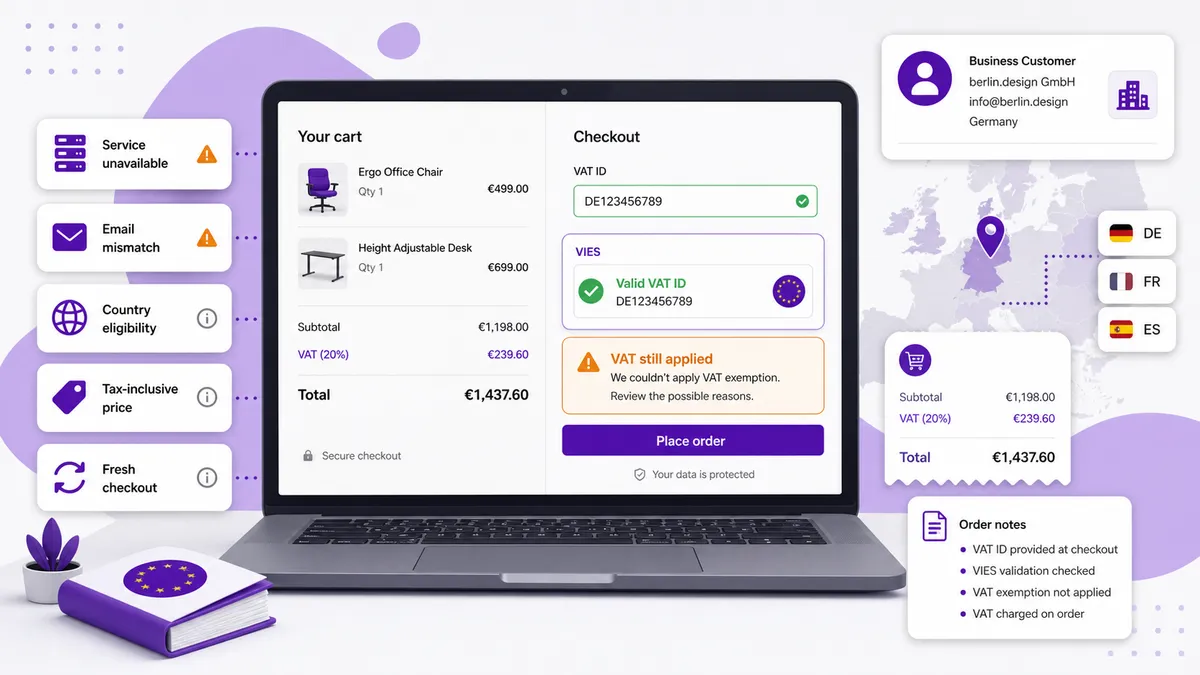
If Shopify still charges VAT after a buyer enters a valid VAT number, the most common causes are a failed VIES check, an exemption that was not applied before checkout, an email mismatch, tax-inclusive product pricing, or an order that does not qualify for the expected cross-border treatment.
Do not remove the tax simply because the number has the right format. Work through these seven checks and keep a record of what happened. Tax rules vary, so confirm uncertain cases with your accountant or tax adviser.
1. Did VIES actually complete the validation?
A VAT number can be correct while the validation service is temporarily unavailable.
Shopify’s official VAT validation troubleshooting guide says that if VIES cannot complete validation, the reverse-charge exemption is not applied and VAT is charged by default. This fail-safe prevents an unverified buyer from receiving an exemption.
VIES or a member state’s system can be unavailable because of maintenance, traffic, or connectivity problems. Retry later and check the European Commission VIES service rather than assuming Shopify rejected a valid business.
2. Is the number active for the relevant cross-border transaction?
Passing a format check is not the same as receiving a successful VIES result.
The country prefix and number length might look correct, but the business may not be registered for intra-EU transactions, the registration may have changed, or the national database may not return a positive result.
Record the exact response. “Looks valid” is not useful evidence. You need to know whether VIES confirmed the number at the time of the attempted purchase.
3. Does the order qualify for the exemption you expect?
A valid VAT number is only one part of the decision. Cross-border B2B treatment depends on the seller, buyer, locations, transaction, and applicable tax rules.
For the common intra-EU reverse-charge scenario, seller and buyer are generally VAT-registered businesses in different EU member states. A domestic order is not automatically exempt simply because the buyer has a VAT number.
Also verify the customer’s billing/shipping country and the location fulfilling the order. If those details changed during checkout, the tax calculation may be responding to a different transaction than the one you tested.
For a fuller explanation, read how EU VAT reverse charge works for Shopify B2B.
4. Was the customer marked exempt before checkout calculated tax?
Timing matters. If the customer completes checkout as a normal taxable customer and you update their profile afterward, the old checkout does not travel back in time and recalculate itself.
Shopify lets merchants set up tax-exempt customers. If you use a manual exemption, configure it before the customer places the order.
An automated workflow should capture the VAT ID, validate it, apply the eligible tax status, and only then send the buyer through checkout. Otherwise you end up charging tax first and correcting it with a refund.
5. Did the buyer use the same email as the exempt customer record?
Shopify notes that tax-exempt customers need to check out using the same email address stored on their customer account.
This is easy to miss in B2B purchasing. A buyer may validate with [email protected], then enter [email protected] at checkout. Those addresses may belong to the same business, but Shopify can treat them as different customer identities.
Check:
- The email used during VAT validation
- The email on the customer record
- The email entered at checkout
- Whether duplicate customer records exist
Keep the identity consistent throughout the flow.
6. Are your product prices tax-inclusive?
If your store uses tax-inclusive pricing, an exempt customer can still see the full listed product price. Shopify’s tax-exemption documentation explicitly warns about this.
That does not necessarily mean tax was added again. It may mean the storefront price already includes tax and your market/pricing setup does not reduce the displayed amount in the way you expected.
Compare the order’s tax lines and total—not only the product-page number. Review your include or exclude tax based on customer country setting and any fixed catalog pricing that may override dynamic behavior.
7. Is an old checkout or stale customer state being reused?
After changing a customer’s tax status, start a fresh test rather than relying on a checkout created under the old state.
Use a clean browser session and confirm:
- The correct customer signs in or uses the matching email.
- The VAT number receives a successful VIES response.
- The eligible exemption is applied before checkout.
- The shipping and billing countries remain correct.
- A newly created checkout shows the intended tax lines.
Also check whether an automation later removes or overwrites customer tags, metafields, or tax status.
What should happen when VIES is down?
The safest default is to charge VAT until validation succeeds. Granting an exemption without evidence can leave the merchant responsible for tax later.
Give the buyer a useful message: explain that VAT validation is temporarily unavailable, let them retry, and provide a support path for a time-sensitive order. Do not describe a VIES outage as an invalid VAT number; those are different problems.
Prevent the problem with a pre-checkout workflow
EU VAT Tax Exemption By DApps adds a customizable VAT ID widget, validates numbers through VIES, and applies exemption for eligible cross-border B2B orders. It can also store VAT data in customer metafields, add tags and order notes, and keep validation logs for operational follow-up.
That gives you a cleaner sequence:
- Buyer enters the VAT ID before checkout.
- VIES returns a successful validation.
- The eligible customer exemption is applied.
- Checkout calculates using the updated status.
- VAT evidence remains connected to the customer and order workflow.
For the implementation options, see how to remove VAT for EU customers with a VAT ID. Then test the complete flow with real store settings before relying on it for live orders.