
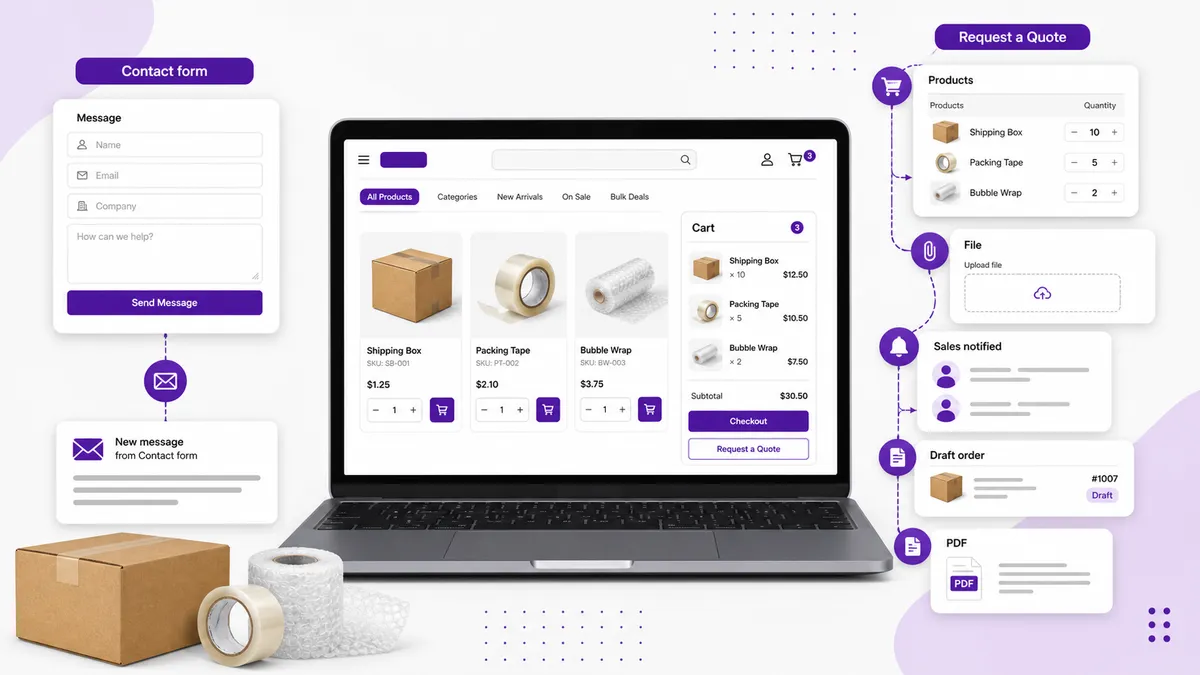
Use a contact form when the enquiry is simple and does not depend on products, quantities, or negotiated pricing. Use a Request a Quote workflow when the buyer needs to select items, provide specifications, receive a formal quotation, and eventually pay through Shopify.
The difference is not the label on the button. It is how much sales work happens after the form arrives.
The short comparison
| Capability | Generic contact form | Request a Quote workflow |
|---|---|---|
| Name, email, message | Yes | Yes |
| Products, variants, and quantities attached | Usually manual | Built into the request |
| Different forms for different products | Limited | Designed for this |
| File uploads and structured specifications | Sometimes | Core RFQ use case |
| Hide price or Add to Cart | Separate theme work | Can be part of the same rules |
| Team quote alerts | Basic email | Email/Slack and workflow visibility |
| Convert enquiry into a Shopify order | Manual re-entry | Draft-order handoff |
| Generate a formal PDF quotation | Separate tool | Can be part of the quote workflow |
When is a contact form enough?
A normal contact form is fine when:
- Enquiry volume is low
- The buyer is asking a general question
- No product or variant needs to be attached
- Your team can respond without calculating a price
- The conversation will not turn into a formal quote or order
Examples include store-support questions, partnership enquiries, stockist applications, or a simple “do you ship to my location?” message.
Do not turn every conversation into a twelve-field RFQ. More structure is only useful when the sales team needs the information.
When does a Request a Quote workflow earn its keep?
Use an RFQ workflow when the answer to “What does it cost?” depends on variables the storefront cannot price honestly.
Common cases include:
- Custom sizes, finishes, or configurations
- Bulk and wholesale quantities
- Freight or installation that must be calculated
- Made-to-order manufacturing
- Equipment, signage, flooring, rentals, and project-based products
- Buyers who need a formal quotation before internal approval
In those cases, a contact form often creates a second round of questions: which item, which variant, how many, where is it going, and when is it needed? A product-aware quote form collects that context at the first touch.
Does the form preserve product context?
This is the first decision test.
If the buyer clicks “Contact us” from a product page and the resulting message does not contain the product, variant, quantity, or URL, your team has to reconstruct the request manually.
A Request a Quote workflow should carry selected items into the form automatically. That lets the buyer ask about one product, several products, or a whole cart without copying names into a message box.
Context reduces mistakes too. “Blue large” in an email is ambiguous. A specific Shopify variant attached to the request is not.
How much qualification do you need?
A generic form is intentionally broad. An RFQ can be designed around the information needed to price the job.
Useful fields might include:
- Company and contact details
- Required quantities
- Target delivery date
- Shipping postcode or country
- Measurements or specifications
- Artwork, plans, or reference files
- Tax or trade-account details
- Notes for individual products
Still, restraint matters. Ask only what changes the quote or helps your team decide whether the opportunity is a fit. Use steps when the form is long, and collect basic contact information early so an incomplete submission is not necessarily a lost lead.
Who sees the enquiry—and how quickly?
Most contact forms send one email. That works until the address belongs to a person who is away, the notification lands in spam, or everyone assumes somebody else is responding.
For B2B quotes, define the operational handoff:
- Which shared inbox or channel receives the alert?
- Who acknowledges the request?
- What is the response target?
- Where are notes and status tracked?
- What happens when a buyer abandons a longer form?
DA:Request a Quote, Hide Price sends email and Slack alerts and supports abandoned-form recovery. It does not replace a sales-ownership rule, but it gives the team a shared place to see the lead.
How does the enquiry become an order?
With a contact form, somebody normally copies the request into Shopify, rebuilds the line items, applies the agreed price, and sends payment instructions.
A quote workflow can remove that re-entry. Request a Quote converts an accepted quote into a Shopify draft order. Your team can then adjust products, discounts, shipping, and taxes in Shopify and send the buyer a checkout link.
Shopify’s own draft-order workflow supports products, custom prices, discounts, shipping, taxes, customers, tags, and payment terms. When the quote hands off there, the order uses the same operational system as the rest of your store.
Do you need a formal quotation?
Many B2B buyers cannot pay from an email saying “it will be about $4,000.” They need a document with line items, company details, terms, and a total that can be approved internally.
If that is normal for your buyers, PDF quotation generation belongs in the workflow—not as a separate spreadsheet assembled after every enquiry.
If buyers only need a quick answer and purchase normally afterward, a contact form may remain simpler.
A five-question decision test
Choose Request a Quote if you answer “yes” to three or more:
- Does pricing depend on quantity, specification, or customer type?
- Does the buyer need to select products before asking?
- Does sales need structured fields or file uploads?
- Must the accepted price become a Shopify order?
- Do buyers need a branded formal quotation?
Choose a contact form if most answers are “no.”
You can use both
This is not an all-or-nothing decision.
Keep a general contact form for support and open-ended questions. Add Request a Quote only to the products, collections, or customers that need a sales-assisted path. Standard products can retain normal pricing and Add to Cart.
That selective setup is usually clearer than forcing every visitor through the same form.
If your B2B enquiries arrive without enough product context and your team rebuilds every sale by hand, install DA:Request a Quote, Hide Price. For the implementation details, see how to add a Request a Quote button to Shopify.