
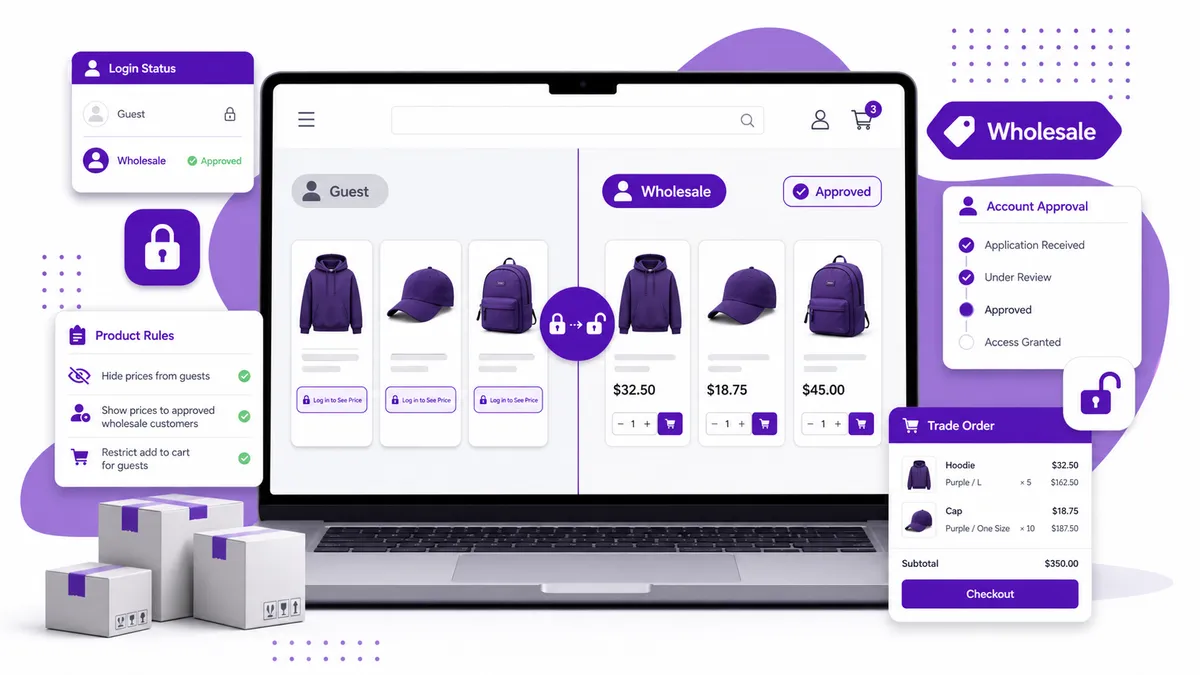
To show Shopify prices only to logged-in wholesale customers, you need two separate checks: is the visitor logged in, and is that customer approved to see wholesale pricing? A login check alone can show prices to every customer account. A customer tag or segment lets you limit access to the trade buyers you actually approved.
The safest setup also controls Add to Cart, replaces the hidden price with a clear instruction, and tests collection, search, recommendation, and mobile surfaces—not just the product template.
Logged in does not automatically mean wholesale
Shopify exposes a customer object to a theme when somebody is logged into a customer account. When nobody is logged in, that object returns nil.
That makes a simple guest/customer split possible. But it does not prove the logged-in customer belongs to your trade program.
Think of the states separately:
| Visitor state | Typical price behavior |
|---|---|
| Guest | Hide price; show Log in to See Price or Request a Quote |
| Logged-in retail customer | Show normal retail price, or keep trade pricing hidden |
| Approved wholesale customer | Show the intended trade price or quote action |
| Logged-in but unapproved applicant | Show an application or approval message |
If your rule is simply “any account can see prices,” a login check may be enough. If wholesale access requires approval, use a customer tag or another explicit wholesale status as well.
Option 1: Add the rule to your theme
A developer can conditionally render the price based on login status and customer tags. The logic might read like this in principle:
{% if customer and customer.tags contains 'wholesale' %}
  {% render 'price', product: product %}
{% else %}
  <a href="/account/login">Log in to see trade pricing</a>
{% endif %}
That is an illustration, not universal theme code. Your theme may use different tag names, snippets, price components, and account URLs. Duplicate the theme and have somebody familiar with Liquid test the change before publishing.
The larger problem is coverage. Prices may be rendered in separate components for product pages, collection cards, predictive search, recommendations, featured products, quick view, and the cart drawer. A condition added to one snippet might not reach the others.
Our broader guide explains the theme-code and app approaches to hiding Shopify prices. For wholesale stores, the extra work is customer approval and access-state testing.
Option 2: Manage price visibility with customer rules
Use an app when non-developers need to change rules, or when visibility differs across products and customer groups.
DA:Request a Quote, Hide Price can hide price and Add to Cart using product and customer-tag rules. For trade catalogs, you can use customer targeting alongside labels such as Login to See Price, Price on Request, or Request a Quote.
That supports more specific scenarios:
- Hide prices from guests across the whole store
- Show prices only to customers carrying a wholesale tag
- Keep fixed prices on retail products but use RFQs for custom lines
- Hide Add to Cart for buyers who need approval or a quotation
- Route unpriced products into a quote form with product context attached
The goal is to make the rule understandable to the merchant team. If every theme change requires a developer to hunt through snippets, a simple pricing policy becomes expensive to maintain.
Should you hide Add to Cart too?
Usually, but not always.
Hide Add to Cart when the shopper cannot complete a valid purchase without approval, a negotiated price, or a quotation. Leaving the button active can put an unpriced item into the cart and create a confusing checkout.
Keep it when the hidden display is intentional but Shopify already knows the correct customer-specific price after login. In that case, test the complete cart and checkout flow to confirm the approved price carries through.
Do not assume that hiding a number on the page changes the underlying product price. Storefront display, cart pricing, catalogs, feeds, structured data, and checkout behavior are separate layers. The method must match the actual business rule.
What should guests see instead of a price?
A blank area looks like a loading error. Give the visitor one obvious next step:
- Log in to See Price when existing trade customers already have access
- Apply for a Trade Account when approval is required
- Request a Quote when the price depends on quantity or specification
- Price on Request for a more formal trade or luxury catalog
- Call for Price when telephone selling is genuinely how your team closes orders
Match the label to the next screen. Do not display “Log in to See Price” if the login page does not explain how a new buyer gets approved.
Build the approval workflow before the display rule
Ask these operational questions first:
- How does a buyer apply?
- Who checks the application?
- Which customer tag marks approval?
- Does approval reveal retail prices, trade prices, or only a quote button?
- What happens when approval is revoked?
- Who tests the buyer’s account before telling them access is ready?
Price visibility is the final output of that workflow. If the customer status is unreliable, the storefront rule will be unreliable too.
Test with a four-account matrix
Create or use four test states:
- Logged out
- Logged in without a wholesale tag
- Logged in with the wholesale tag
- Logged in with a deliberately incorrect or expired tag
For each state, test:
- Product page
- Collection and search results
- Featured and recommended products
- Quick view
- Cart drawer and cart page
- Mobile and desktop
- A retail product that should remain public
- A trade product that should stay restricted
Also test after publishing a theme update. Custom Liquid changes can be lost or bypassed when a new theme version uses different price components.
The practical answer
Use a Liquid login check for a small, stable rule that a developer can maintain. Add a customer tag when wholesale access requires approval. Use a rule-based app when access varies across the catalog or the hidden price needs to lead into a structured quote process.
For a no-code workflow that combines customer/product rules with Login to See Price and Request a Quote, install DA:Request a Quote, Hide Price.