
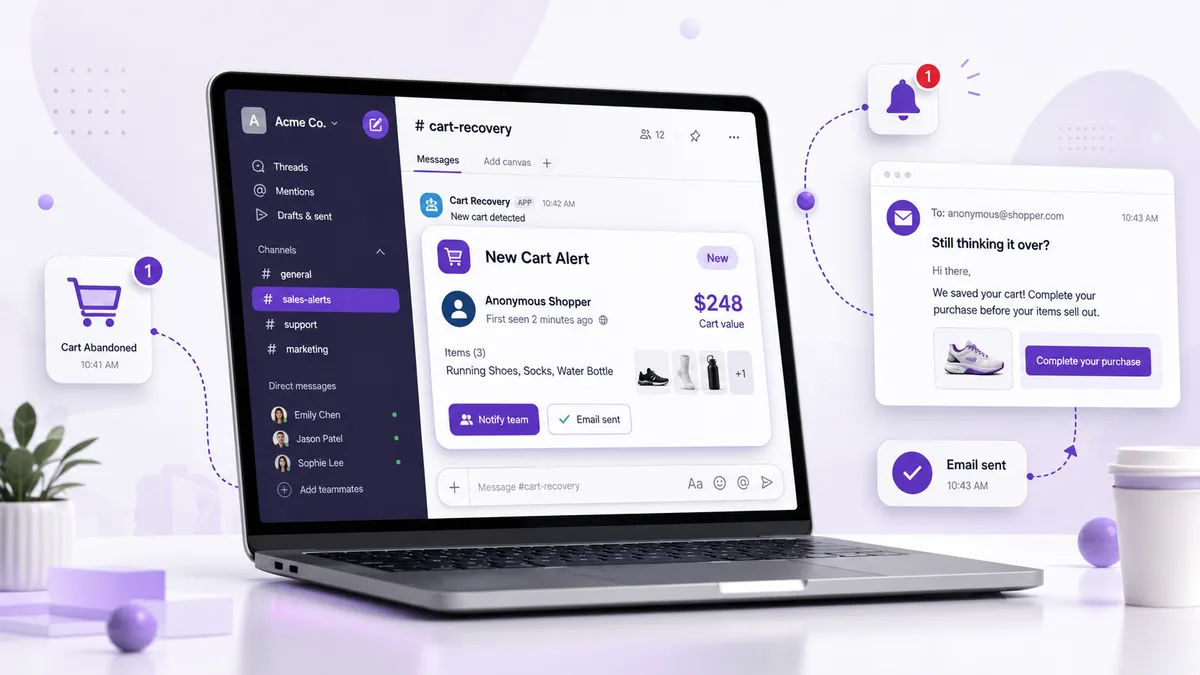
Speed is the whole game in cart recovery. The faster you reach a shopper after they abandon a valuable cart, the more likely they are to come back. Automated email sequences are too slow for your biggest carts — by the time they fire, the moment’s gone.
A real-time alert workflow fixes that. Instead of waiting for a scheduled email, you get pinged the instant a large cart goes cold and act while intent is still high. Here’s how to build that workflow with Cart Radar.
The Workflow at a Glance
A good real-time recovery loop has four moving parts:
- A trigger — which carts are worth an alert
- A channel — where the alert lands so someone sees it fast
- An action — how you actually reach the customer
- A feedback loop — measuring what worked
Get these four right and you’ve got a repeatable system, not a scramble.
Step 1: Set a Smart Trigger
The trigger is your cart-value threshold plus an inactivity window. Together they decide what earns an alert.
- Threshold: Set it well above your average order value so you only hear about carts worth a personal touch. If your AOV is $90, a $300 threshold keeps the signal high and the noise low.
- Inactivity window: How long a cart sits idle before it counts as abandoned. A shorter window (15–20 minutes) means you reach shoppers while they’re likely still nearby; a longer one avoids pinging people who are just multitasking.
Tune these two settings and you control exactly how many alerts you get and how urgent each one is.
Step 2: Route Alerts Where You’ll See Them
An alert only helps if someone acts on it fast. Cart Radar sends instant email and Slack notifications — pick the channel that fits how you work:
- Solo owner? Email straight to the inbox you check constantly.
- Small team? Pipe alerts into a dedicated Slack channel like
#cart-recovery. Now whoever’s free can claim the cart, and nothing falls through the cracks.
Because each alert carries the cart’s value and contents, your team can triage instantly — jump on the $800 cart, let the borderline one wait.
Step 3: Reach the Customer the Right Way
This is where the recovery actually happens. From any alert you have two strong plays:
Send a personal email. For a shopper who hesitated over shipping cost or a return question, a short, human note answering that specific worry often does more than any discount. It signals a real business paying attention.
Create a draft order. For a shopper who was clearly ready but got interrupted, build a draft order with their exact items pre-loaded and send a ready-to-pay link. You’ve removed every ounce of friction — no rebuilding the cart, just one click to finish.
A simple rule of thumb: use email when there’s an objection to overcome, and a draft order when there’s just friction to remove.
Step 4: Measure and Refine
A workflow you can’t measure is a habit, not a system. Cart Radar’s recovery tracking shows which alerted carts returned and totals the revenue recovered — so you can answer the only question that matters: is this working?
Use that data to tighten the loop:
- Recovering almost everything? Lower your threshold to catch more carts.
- Drowning in alerts? Raise the threshold or shorten the window to sharpen the signal.
- One channel getting ignored? Move alerts to where your team actually responds.
Put the Workflow to Work
Real-time recovery isn’t about working harder on abandoned carts — it’s about working faster on the few that are worth it. Set a smart trigger, route alerts where you’ll see them, reach the customer with the right play, and let the numbers guide your tuning.
Cart Radar’s free plan covers up to 5 alerts a month so you can test the workflow on your biggest carts. The Pro plan ($29/month, or $228/year) removes the cap for stores ready to catch every high-value cart.
Install Cart Radar and build your real-time recovery loop today.